Friday, September 25, 2020

Accessible Machine Learning for SEOs — Whiteboard Friday

Posted by BritneyMuller

Machine learning — a branch of artificial intelligence that studies the automatic improvement of computer algorithms — might seem far outside the scope of your SEO work. MozCon speaker (and all-around SEO genius) Britney Muller is here with a special edition of Whiteboard Friday to tell you why that's not true, and to go through a few steps to get you started. 

To see more on machine learning from Britney and our other MozCon 2020 speakers, check out this year's video bundle. 

Get my MozCon 2020 video bundle
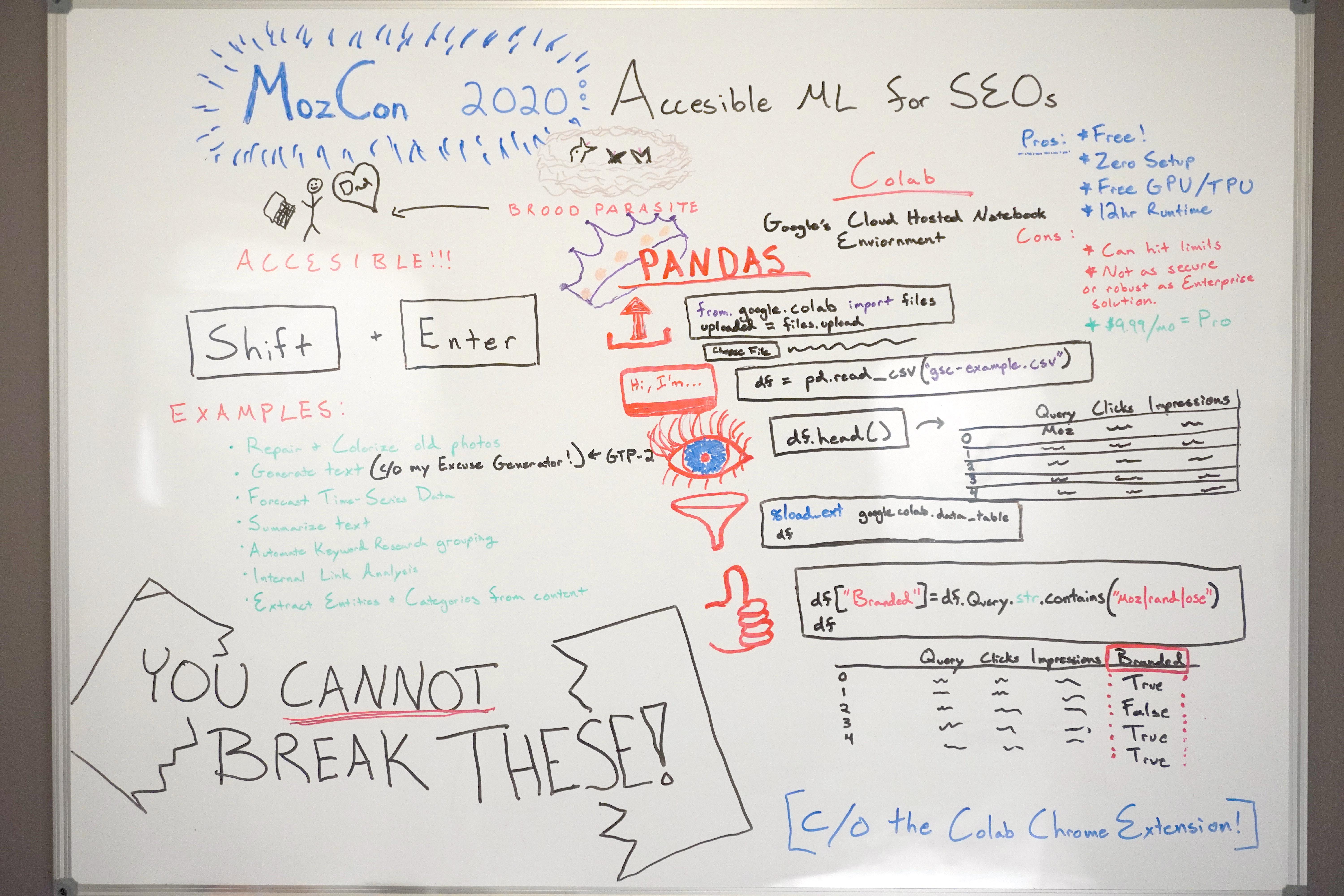
Accessible Machine Learning

Click on the whiteboard image above to open a high resolution version in a new tab!

Video Transcription

Hey, Moz fans. Welcome to this special edition of Whiteboard Friday. Today we are taking a sneak peek at what I spoke about at MozCon 2020, where I made machine learning accessible to SEOs everywhere.

This is so, so exciting because it is readily at your fingertips today, and I'm going to show you exactly how to get started. 

So to kick things off, I learned about this weird concept called brood parasites this summer, and it's fascinating. It's basically where one animal tricks another animal of the same species to raise its young.

It's fascinating, and the more I learned about it, the more I realized: oh my gosh, I'm sort of like a brood parasite when it comes to programming and machine learning! I latch on and find these great models that do all the work — all of the raising — and I put in my data and my ideas, and it does things for me.

So we are going to use this concept to our advantage. In fact, I have been able to teach my dad most of these models that, again, are readily available to you today within a tool called Colab. Let me just walk you through what that looks like. 

Models to get you started

So to get started, if you want to start warming up right now, just start practicing clicking "Shift" and then click "Enter".

Just start practicing that right now. It's half the battle. You're about to be firing up some really cool models. 


All right. What are some examples of that? What does that look like? So some of the models you can play with today are things like DeOldify, which is where you repair and colorize old photos. It's really, really fun. 

Another one is a text generator. I created one with GTP-2 — super silly, it's this excuse generator. You can manipulate it and make it do different things for you. 

There's also a really, really great forecasting model, where you basically put in a chunk of time series data and it predicts what the future might have in store. It's really, really powerful and fun.

You can summarize text, which is really valuable. Think about meta descriptions, all that good stuff. 

You can also automate keyword research grouping, which I'll show you here in a second. 

You can do really powerful internal link analysis, set up a notebook for that.

Perhaps one of the most powerful things is you can extract entities and categories as Google perceives them. It's one of my favorite APIs. It's through Google's NLP API. I pull it into a notebook, and you basically put the URLs you want to extract this information from and you can compare how your URL compares to competitors.

It's really, really valuable, fun stuff. So most importantly, you cannot break any of this. Do not be intimidated by any of the code whatsoever. Lots of seasoned developers don't know what's happening in some of those code blocks. It's okay.

Using Colab

We get to play in this environment. It's hosted in Google Drive, and so there's no fear of this breaking anything on your computer or with your data or anything. So just get ready to dive in with me. Please, it's going to be so much fun. Okay, so like I said, this is through a free tool called Colab. So you know how Google basically took Excel and made Google Sheets?

They did the same thing with what's known as Jupyter Notebooks. So these were locally on computers. It's one of the most popular notebook environments. But it requires some setup, and it can be somewhat clunky. It gets confused with different versions and yada, yada. Google put that into the cloud and is now calling it Colab. It's unbelievably powerful.

So, again, it's free. It's available to you right now if you want to open it up in a new tab. There is zero setup. Google also gives you access to free GPU and TPU computing, which is great. It has a 12-hour runtime. 

Some cons is that you can hit limits. So I hit the limits, and now I'm paying $9.99 a month for the Pro version and I've had no problems.

Again, I'm not affiliated with this whatsoever. I'm just super passionate about it, and the fact that they offer you a free version is so exciting. I've already seen a lot of people get started in this. It's also something to note that it's probably not as secure or robust as Google's Enterprise solution. So if you're doing this for a large company or you're getting really serious about this, you should probably check out some other options. But if you're just kind of dabbling and want to explore and have fun, let's keep this party going. 

Using pandas

All right. So again, this is basically a cloud hosted notebook environment. So one thing that I want to really focus on here, because I think it's the most valuable for SEOs, is this library known as "pandas".

Pandas is a data frame library, where you basically run one — or two — lines of code. You can choose your file from your local computer, so I usually just upload CSVs. This silly example is one that I really did run with Google Search Console data.

So you run this in a notebook. Again, I'm sharing this entire notebook with you today. So if you just go to it and you do this, it brings you through the cells. It's not as intimidating as it looks. So if you just click into that first cell, even if it's just that text cell, "Shift + Enter", it will bring you through the notebook. 


So once you get past and once you fire up this chunk of code right here, upload your CSV. Then once you upload it, you are going to name your data frame. 


So these are the only two cells you need to really change or do anything with if you want. Well, you need to. 

So we are uploading your file, and then we are grabbing that file name. In this case, mine was just "gsc-example.csv". Again, once you upload it, you will see the name in that output here. So you just put that within this code block, run this, and then you can do some really easy lines of code to check to make sure that your data is in there.


So one of the first ones that most people do is "df". This is your data frame that you named with your file right here. So you just do "df.head()". This shows you the first five rows of your data frame. You can also do "df.tail()", and it shows you the last five rows of your data frame.

You can even put in a number in here to modify how many rows you want to explore. So maybe you do "df.head(30)", and then you see the first 30 rows. It's that easy just to get it in there and to see it. Now comes the really fun stuff, and this is just tip of the iceberg.

So you can run this really, really cool code cell here to create a filterable table. What's powerful about this, especially with your Google Search Console data, is you can easily extract and explore keywords that have high click-through rate and a low ranking in search. It's one of my favorite ways to explore keyword opportunities for clients, and it couldn't be easier.

So check that out. This is kind of the money part right here. 

If you're doing keyword research, which can take a lot, right, you're trying to bucket keywords, you're trying to organize topics and all that good stuff, you can instantly create a new column with pandas with branded keyword terms.

So just to walk you through this, we're going "df["Branded"]". This is the name of the new column we're going to create. We have this query string "contains," and this is just regex, ("moz|rand|ose"). So any keywords that contain one of those words gets in the "Branded" column a "True".

So now that makes filtering and exploring that so much faster. You can even do this in ways where you can create an entirely different data frame table. So sometimes if you have lots and lots of data, you can use the other cell in that example. All of these examples will be in the notebook.

You can use that and export your keywords into buckets like that, and there's no stall time. Things don't freeze up like Excel. You can account for misspellings and all sorts of good stuff so, so easily with regular expressions. So super, super cool.

Conclusion

Again, this is just tip of the iceberg, my friends. I am most excited to sort of plant this seed within all of you so that you guys can come back and teach me what you've been able to accomplish. I think we have so much more to explore in this space. It is going to be so much fun. If you get a kick out of this and you want to continue exploring different models, different programs within Colab, I highly suggest you download the Colab Chrome extension.

It just makes opening up the notebook so much easier. You can save a copy to your drive and play with it all you want. It's so much fun. I hope this kind of sparked some inspiration in some of you, and I am so excited to hear what all of you think and create. I really appreciate you watching.

So thank you so much. I will see you all next time. Bye.

Video transcription by Speechpad.com


Ready for more?

You'll uncover even more SEO goodness in the MozCon 2020 video bundle. At this year's special low price of $129, this is invaluable content you can access again and again throughout the year to inspire and ignite your SEO strategy:

  • 21 full-length videos from some of the brightest minds in digital marketing
  • Instant downloads and streaming to your computer, tablet, or mobile device
  • Downloadable slide decks for presentations

Get my MozCon 2020 video bundle


Sign up for The Moz Top 10, a semimonthly mailer updating you on the top ten hottest pieces of SEO news, tips, and rad links uncovered by the Moz team. Think of it as your exclusive digest of stuff you don't have time to hunt down but want to read!


from The Moz Blog https://ift.tt/2G5IskM
via IFTTT

Tuesday, September 22, 2020

How to Turn One Piece of Content into Multiple for SEO

Posted by liambbarnes

As most SEO specialists have learned, you must create quality content to grow organically. The same thing can be said for businesses that are building a social media presence or a new newsletter following.

But as people consume more and more content each day, they become less receptive to basic content that doesn't provide a new perspective. To counter this issue, you must make sure that your content is native to each platform you publish on.

However, that doesn’t mean that you need to start from scratch. There's a way to take one content idea and turn it into multiple, which can scale across multiple platforms and improve your brand awareness.

It takes time to write a brand-new blog article every day, especially when you're an in-house team with a low number of resources and budget. The biggest challenge here is building a content strategy at scale.

So, how do you create a lot of great content?

You start with video.

If you have a video on a relevant topic, it can be repurposed into various individual pieces of content and distributed over a period of time across the right channels. Let’s walk through the process.

Using video to scale content

Did you know that the average person types at 41 words per minute (WPM), but the average person speaks at about 150 WPM? That is about 3.5 times faster speaking rather than typing. 

In fact, this article was transcribed.

For every article you write about, you must do extensive research, write out your first draft, edit, make changes, and more. It can consume an entire workday.

An easier way to do this? Record yourself on Loom or another video software, save it, and send the video file to an audio/video transcription service. There are so many tools, like Rev.com or TranscribeMe, that do this for relatively cheap.

Of course, even if you're relying on text-to-speech, there's still editing time to take into account, and some would argue it will take MORE time to edit a text-to-speech transcription. There isn’t a “best way” to create content, however, for those who aren't strong writers but are strong speakers, transcription will be a powerful way to move at a quicker pace.

The step-by-step process 

Once you write out your content, how do you ensure that people read it?

Like any other content strategy, make sure that the process of planning, creating, and executing is written down (most likely digitally in a spreadsheet or tracking tool) and followed.

Let’s break down how to get the most out of your content.

1. Grab attention with your topic

Sometimes, content ideation can be the most challenging part of the process. Depending on the purpose of your content, there are various starting points.

For example, if you're writing a top-of-funnel blog article where the goal is to drive high amounts of organic traffic, start by performing keyword research to craft your topic. Why? You need to understand what your audience searches for and how to ensure you’re in the mix of search results. 

If you're creating a breakdown of your product or service, you may want to start by interviewing a subject matter expert (SME) to gain real-life details on the product/service and the solutions it provides to your target audience. Why? Note what they’re saying are the most important aspects or if there is a new feature/addition for the audience. These points can be tied into a topic that might pique the target reader's interest.

2. Create an outline for the blog

When you're building out your blog structure, record a video similar to how you would write a blog article.

In this case, by creating an outline for the article with the questions that you ask yourself, it'll be easier to format the transcription and the blog after you record.

3. Pick your poison (distribution strategy)

Now that you're ready to begin recording your video, decide where your content will be distributed.

The way you'll distribute your content heavily influences the way you record your video, especially if you're going to be utilizing the video as the content itself (Hello, YouTube!).

For example, if you run a business consultancy, the videos that you record should be more professional than if you run an e-commerce surf lifestyle brand. Or, if you know you’re going to be breaking the video up, leave time for natural “breaks” for easy editing later on.

By planning ahead of time, you give yourself a better idea of where the content will go, and how it will get there.

4. Your time to shine

There are numerous free video recording software available, including Zoom and Loom.

With Zoom, you can record the video of yourself speaking into your camera, and you will get an audio file after you hang up your call.

With Loom, you can use the chrome extension, which allows you to record yourself in video form while sharing your screen. If you have additional content, like a Powerpoint presentation or a walk-through, this might be the tool for you.

Regardless of the way that you record, you need an audio file to transcribe and transform into other content formats later on.

5. Transcribe your video

The average writer transcribes one hour of audio in around four hours, but some of the best transcribers can do it in as little as two hours.

To put that into perspective, the average one-hour audio file is about 7,800 words, which would take the average writer around three and a half hours to write.

Additionally, you have to add research time, internal linking, and many other factors to this, so on average it'll take around an hour to write 1,000 words of a high-quality blog post.

Transcription shortens the length of this process.

When looking to transcribe your audio, you can send files out to transcription tools including Rev or TranscribeMe. Once you send them the audio file, you'll typically receive the audio file back in a few hours (depending on the demand).

6. Alter transcription into blog format

You'll receive the transcribed content via email, broken out by speaker. This makes it much easier to format post-transcription.

If you properly outlined the blog prior to recording, then this editing process should be simple. Copy and paste each section into the desired area for your blog and add your photos, keywords, and links as desired.

7. Chop your video into digestible parts

Here’s where things get interesting.

If you're using your video for social media posts, shorten the video into multiple parts to be distributed across each platform (and make sure they’re built to match each platform's guidelines).

Additionally, quotes from the video can be used to create text graphics, text-based social posts, or entire articles themselves.

Think of the watering holes that your target audience consumes information on the internet:

  • Google
  • LinkedIn
  • Instagram
  • Facebook
  • Twitter
  • YouTube

Each platform requires creating a different experience that involves new, native content. But that doesn’t mean you have to start at zero.

If you have a 10-minute-long video, it can be transcribed into a 2,500-word blog that takes about 10-15 minutes to read.

Boom. You have another resource to share, which can also include proper keywords so it ranks higher on the SERP.

Let’s say you end up editing the video down to about five minutes. From here, you can make:

  • A five minute video to post on YouTube and your blog
  • Ten 30-second videos to post across several social media platforms
  • Twenty 100-word posts on LinkedIn
  • Thirty 50 to 60-word posts on Twitter

Woah.

Not to mention there are other platforms like Reddit and Quora, as well as email marketing, that you can also distribute your content with. (Turn one of the 100-word LinkedIn posts into the opening in your latest newsletter, and attach the full video for those who want to learn more!)

By starting off with an all-encompassing video, you extend your content capabilities from a regular blog article into 50+ pieces of content across multiple social media platforms and search engines.

For example, Lewis Howes (and many other brands and marketers) are famous for utilizing this method.

As you can see below, Howes had an interview for his podcast with Mel Robbins, which is scaled across YouTube and podcast platforms, but he took a quote from her in the interview and scaled it across Instagram, Twitter, and LinkedIn.

When you build out your content calendar, simply copy and paste certain sections into an excel spreadsheet, and organize them based on date and platform. Make sure they make sense on the platform, add an extra line or two if you need to, and work your magic.

This will save you hours of time in your planning process.

8. Distribute

Now that you have created your various forms of content, it’s time to make sure it appears before the right eyes.

Having a consistent flow of relevant content on your website and social media platforms is a crucial part of empowering your brand, building credibility, and showing that you’re worth trusting as a potential partner.

As you repurpose older content as well, you can repeat this process and pull together another 50+ pieces of content from a previously successful article.

Improving organic search visibility

"Discoverability" is a popular term in marketing. Another way to say it is "organic search visibility". Your brand’s search visibility is the percentage of clicks that your website gets in comparison to the total number of clicks for that particular keyword or group of keywords.

Normally, you can improve your visibility through writing a piece of content that reflects a target keyword the best and build links to that page, which improves your rankings for that keyword and long-tail variations of that keyword.

However, as you begin to grow your business, you may begin heavily relying on branded search traffic.

In fact, one of the biggest drivers of organic traffic is branded traffic. If you don't have an authoritative brand, it's challenging to receive backlinks naturally, and therefore more difficult to rank organically.

One of the biggest drivers of brand awareness is through social media. More than 4.5 billion people are using the internet and 3.8 billion are using social media.

If you want more people to search for your brand, push relevant social media campaigns that do just that.

But even further than that, we are seeing more and more social media platforms such as Pinterest, YouTube, and Twitter showing up as search results and snippets. For example, below is the SERP for the keyword “how to make cookies”, where a series of YouTube videos show up:

And this SERP for the keyword “Moz“ has the most recent Tweets from Moz's Twitter.

Writing content that ranks will continue to be important — but as Google keeps integrating other forms of social media into the SERPs, make time to post on every social media platform to improve search visibility and make your brand discoverable. 

But, duplicate content?

Duplicate content can be defined as the same content used across multiple URLs, and can be detrimental to your website’s health. However, from what we have seen through multiple conversations with marketers in the SEO world, there is no indication that websites are getting penalized for duplicate content when reposting said content on social media platforms.

Conclusion

Say goodbye to the time drain of creating one piece of content at a time. The most effective way to create a successful content marketing strategy is to share thought-provoking and data-driven content. Take advantage of this process to maximize your output and visibility.

Here are some final tips to take away to successfully launch a content marketing strategy, using this method:

  1. Consistently analyze your results and double down on what works.
  2. Don’t be afraid to try new tactics to see what your audience is interested in (Check out a real-world content strategy I helped get results for here).
  3. Analyze the response from your audience. They'll tell you what is good and what is not!

Have other ideas? Let me know in the comments! 


Sign up for The Moz Top 10, a semimonthly mailer updating you on the top ten hottest pieces of SEO news, tips, and rad links uncovered by the Moz team. Think of it as your exclusive digest of stuff you don't have time to hunt down but want to read!


from The Moz Blog https://ift.tt/3ciwXCH
via IFTTT
Monday, September 21, 2020

Search Intent and SEO: A Quick Guide

Posted by DawnMacri

Understanding search intent can be the secret ingredient that brings your content strategy from okay to outstanding. As an SEO Strategist at a digital marketing agency (Brainlabs), we often find clients on the brink of ranking success. They’re sitting on stellar content that simply isn’t ranking for their target keywords. Why? Oftentimes, the keywords and the intent simply don’t match.

Here we’ll discuss the different types of search intent, how to determine the best intent for given keywords, and how to optimize for search intent. First–let’s iron out the basics.

What is search intent?

Search intent (also known as user intent) is the primary goal a user has when searching a query in a search engine. Many times, users are searching for a specific type of answer or resource as they search.

Take pizza for example. Searching for a pizza recipe has a different intent than searching for a takeout pizza, which is also different from searching for the history of pizza. Though they all revolve around the same overall topic (pizza), these users all have different intents.

Why is search intent important for SEO?

Google cares about search intent

The short answer is: Satisfying search intent is a primary goal for Google, which in turn makes it a primary goal for SEOs. When a user searches for a specific term and finds irrelevant information, that sends a signal back to Google that the intent is likely mismatched.

For example, if a user searches “How to build a website,” and they’re shown a slew of product pages for CMS platforms and hosting sites, they’ll try another search without clicking on anything. This is a signal to Google that the intent of those results do not reflect the intent of the searcher.

Broaden your reach across funnel stages

When it comes to running a business and building a successful content marketing strategy, I can’t stress enough the importance of remembering search intent, and letting that be the driving force behind the pieces of content you create and how you create them.

And just why is this so important? The more specific your content is to various search intents, the more users you can reach, and at different stages of the funnel. From those who are still to discover your brand to those looking to convert, you can increase your chances of reaching them all by focusing your efforts on matching search intent.

You can improve rankings

Since Google’s primary ranking factors are relevance, authority, and user satisfaction, it’s easy to connect the dots and see how improving your keyword targeting to mirror search intent can improve your overall rankings.

Relevance: This has to do with your user’s behavior. If they find the information they’re looking for on your site, they’re less likely to return to Google within seconds and explore a different result (pogo-sticking). You’ll notice a difference in such KPIs as click-through rate and bounce rate when your content is relevant to search intent.

Authority: While much of a site’s authority is connected to backlinks, it’s also important to develop a strong internal linking strategy that signals to Google “I have a lot of content covering all angles and intents surrounding this topic” to rank well. Additionally, you can increase brand authority and visibility by creating valuable content around topics your brand is well versed in, that satisfies various intents.

User satisfaction: Does the content you create provide value and is it relevant to your audience? End of story.

Types of search intent

While there are endless search terms, there are just four primary search intents:

  1. Informational
  2. Preferential/Commercial Investigation
  3. Transactional
  4. Navigational

Now you may be thinking, that’s all well and good, but what do they mean for my content? Luckily, I’ve broken each one down with example terms that suggest intent. Keep in mind, however, that searches are not binary –– many will fall under more than one category.

Informational

As you may have guessed, searches with informational intent come from users looking for... information! This could be in the form of a how-to guide, a recipe, or a definition. It’s one of the most common search intents, as users can look for answers to an infinite number of questions. That said, not all informational terms are questions. Users searching for simply “Bill Gates” are most likely looking for information about Bill Gates.

Examples:

  • How to boil an egg
  • What is a crater
  • Ruth Bader Ginsburg
  • Directions to JFK Airport

Preferential/Commercial Investigation

Before they’re ready to make a purchase, users start their commercial investigation. This is when they use search to investigate products, brands, or services further. They’re past the informational stage of their research and have narrowed their focus to a few different options. Users here are often comparing products and brands to find the best solution for them.

Note: These searches often include non-branded localized terms such as “best body shop near me” or “top sushi restaurant NYC.”

Examples:

  • Semrush vs Moz
  • Best website hosting service
  • Squarespace reviews
  • Wordpress or wix for blog

Transactional

Transactional searchers are looking to make a purchase. This could be a product, service, or subscription. Either way, they have a good idea of what they’re looking for. Since the user is already in buying mode, these terms are usually branded. Users are no longer researching the product, they’re looking for a place to purchase it.

Examples:

  • Buy Yeti tumbler
  • Seamless coupon
  • Shop Louis Vuitton bags
  • Van’s high tops sale

Navigational

These searchers are looking to navigate to a specific website, and it’s often easier to run a quick search in Google than to type out the URL. The user could also be unsure of the exact URL or looking for a specific page, e.g. a login page. As such, these searches tend to be brand or website names and can include additional specifications to help users find an exact page.

Examples:

  • Spotify login
  • Yelp
  • MOZ beginner SEO
  • distilledU

How to determine search intent

Consider keyword modifiers

As we briefly noted above, keyword modifiers can be helpful indicators for search intent. But it’s not enough just to know the terms, you may also be wondering, when it comes to keyword research, how do you find these terms?

Thankfully, there are a range of trusted keyword research tools out there to use. Their filter features will be most useful here, as you can filter terms that include certain modifiers or phrases.

Additionally, you can filter keywords by SERP feature. Taking informational intent for example, you can filter for keywords that rank for knowledge panels, related questions, and featured snippets.

Read the SERPs

Another way to determine search intent is to research the SERPs. Type in the keyword you’re targeting into the search bar and see what Google comes up with. You’ll likely be able to tell by the types of results what Google deems the most relevant search intent for each term.

Let’s take a closer look at search results for each intent type.

SERP results for informational intent

As mentioned above, informational keywords tend to own SERP results that provide condensed information. These include knowledge grabs, featured snippets, and related questions. The top results are most likely organic results, and consist of Wikipedia, dictionary, or informative blog posts.

SERP results for preferential/commercial research intent

Preferential intent is similar in that results may include a featured snippet, but they’ll also include paid results at the top of the SERP. The results will also likely provide information about the brands searched, rather than topical information.

In the example below, the organic results compare product features between competing site hosts, rather than explaining what site hosts are and how they function.

SERP results for transactional intent

Transactional SERPs are some of the most straightforward to spot. They usually lead with paid results and/or shopping results, shopping carousels, and reviews. The organic results are largely product pages from online and brick and mortar retailers, and depending on the search, can include maps to their locations.


SERP results for navigational intent

Since users with navigational intent already know which website they’re looking for, these results usually feature the most relevant page at the top: e.g. if the user searches “Spotify”, Spotify’s homepage will be the first result, whereas the login page will take first position for “Spotify login.”

Additional features such as site links, knowledge cards, and top stories may also be present, depending on the specific search.

Look at the full picture

Keep in mind that terms often have more than one search intent, so looking only at keywords or the SERP is rarely enough to truly define it. That said, taking this holistic approach will bring you closer to the most prominent intent.

It’s also important to note that SERPs are volatile, so while a keyword may rank for one intent this month, that could change next month.

How to optimize for search intent

Match metadata and content type to the intent

You’ve done your research and know which keywords you’re targeting with which pages. Now it’s time to optimize. A solid place to start is with your pages’ metadata –– update your title tag, H1, and H2s to reflect your specific keyword targeting. To increase click-through rate, try to leverage your title tag with some snappy copy (without creating clickbait).

Examine the competition

As with most competitions, it’s a good idea to suss out the current winners prior to the event. So, before jumping in to creating new pages or reformatting existing content, take a look at the top-ranking pages and ask yourself the following questions:

  • How are they formatted?
  • What’s their tone?
  • Which points do they cover?
  • What are they missing?

You can now use your answers to create the best, most relevant piece of content on the topic.

Format content for relevant SERP features

Just as you used the SERP features as clues to search intent, they can also be used to inform your pages’ formatting and content. If the featured snippet contains a numbered list, for example, it’s safe to say that Google appreciates and rewards that format for that term.

In a similar vein, if the SERP returns related questions, be sure to answer those questions clearly and concisely in your content.

Key takeaways:

When creating SEO content around search intent, be sure to keep the following in mind:

  • Understand the search intent before optimizing content
  • When discovering new terms, use specific modifiers in your keyword research
  • Use the SERPs to determine optimal formatting and content options
  • Provide valuable, quality content every time

Creating SEO optimized content for specific search intents is simple, but not easy. Follow these guidelines and you’ll be well on your way to giving users the content they need in a format that they want.

For a deeper dive on fulfilling search intent, be sure to check out this informative Whiteboard Friday from Britney Muller.


Sign up for The Moz Top 10, a semimonthly mailer updating you on the top ten hottest pieces of SEO news, tips, and rad links uncovered by the Moz team. Think of it as your exclusive digest of stuff you don't have time to hunt down but want to read!


from The Moz Blog https://ift.tt/2HkACED
via IFTTT

Friday, September 18, 2020

The Theory Behind Ranking Factors — Whiteboard Friday

Posted by rjonesx.

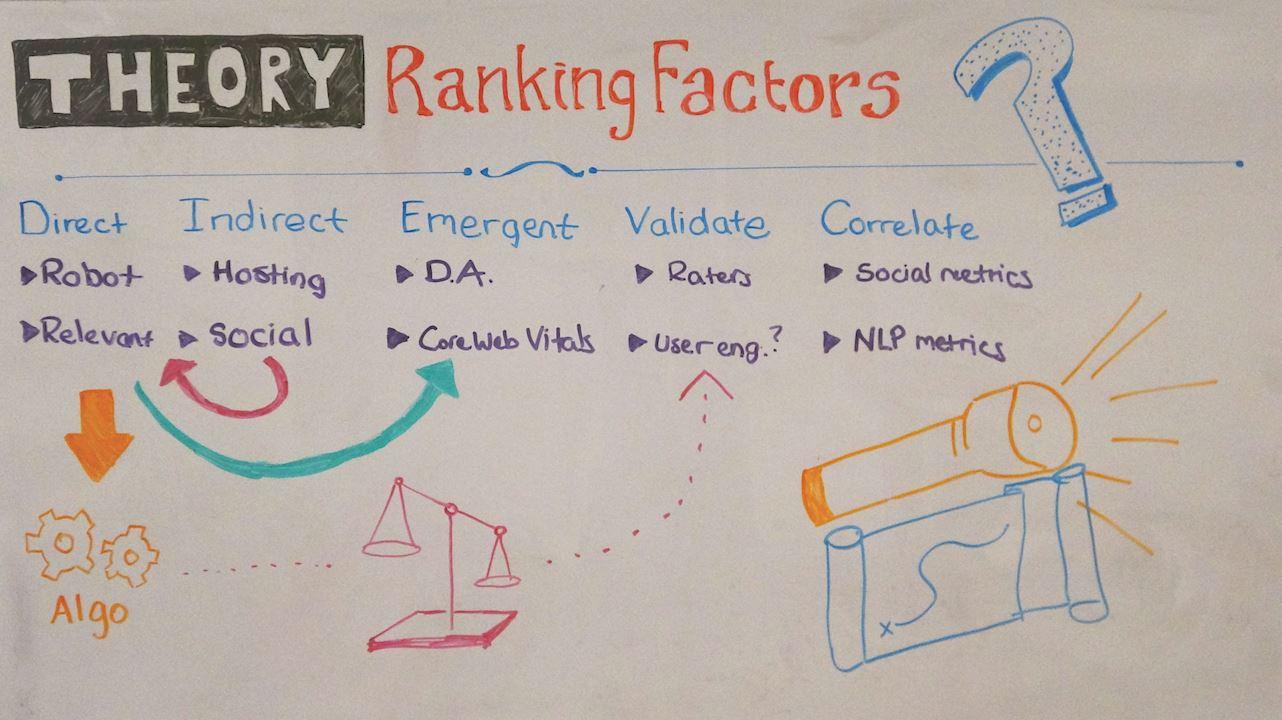
Since day one of SEO, marketers have tried to determine what factors Google takes into account when ranking results on the SERPs. In this brand new Whiteboard Friday, Russ Jones discusses the theory behind those ranking factors, and gives us some improved definitions and vocabulary to use when discussing them.

Agency tactics

Click on the whiteboard image above to open a high resolution version in a new tab!

Video Transcription

Hi, folks. Welcome back to another Whiteboard Friday. Today, we're going to be talking about ranking factors and the theory behind them, and hopefully get past some of these — let's say controversies — that have come up over the years, when we've really just been talking past one another.

You see, ranking factors have been with us since pretty much day one of search engine optimization. We have been trying as SEOs to identify exactly what influences the algorithm. Well, that's what we're going to go over today, but we're going to try and tease out some better definitions and vocabulary so that we're not talking past one another, and we're not constantly beating each other over the heads about correlation and not causation, or some other kind of nuance that really doesn't matter.

Direct 

So let's begin at the beginning with direct ranking factors. This is the most narrow kind of understanding of ranking factors. It's not to say that it's wrong — it's just pretty restrictive. A direct ranking factor would be something that Google measures and directly influences the performance of the search result.

So a classic example would actually be your robots.txt file. If you make a change to your robots.txt file, and let's say you disallow Google, you will have a direct impact on your performance in Google. Namely, your site is going to disappear.

The same is true for the most part with relevancy. Now, we might not know exactly what it is that Google is using to measure relevancy, but we do know that if you improve the relevancy of your content, you're more likely to rank higher. So these are what we would call direct ranking factors. But there's obviously a lot more to it than that.

Google has added more and more features to their search engine. They have changed the way that their algorithm has worked. They've added more and more machine learning. So I've done my best to try and tease out some new vocabulary that we might be able to use to describe the different types of ranking factors that we often discuss in our various communities or online.

Indirect 

Now, obviously, if there are direct ranking factors, it seems like there should be indirect ranking factors. And these are just once-removed ranking factors or interventions that you could take that don't directly influence the algorithm, but they do influence some of the direct ranking factors which influence the algorithm.

I think a classic example of this is hosting. Let's say you have a site that's starting to become more popular and it's time to move off of that dollar-a-month cPanel hosting that you signed up for when you first started your blog. Well, you might choose to move to, let's say, a dedicated host that has a lot more RAM and CPU and can handle more threads so everything is moving faster.

Time to first byte is faster. Well, Google doesn't have an algorithm that's going out and digging into your server and identifying exactly how many CPU cores there are. But there are a number of direct ranking factors, those that are related perhaps to user experience or perhaps to page speed, that might be influenced by your hosting environment.

Subsequently, we have good reason to believe that improving your hosting environment could have a positive influence on your search rankings. But it wouldn't be a direct influence. It would be indirect. 

The same would be true with social media. While we're pretty sure that Google isn't just going out and saying, "Okay, whoever is the most popular on Twitter is going to rank," there is good reason to believe that investing your time and your money and your energy in promoting your content on social media can actually influence your search results.

A perfect example of this would be promoting an article on Facebook, which later gets picked up by some online publication and then links back to your site. So while the social media activity itself did not directly influence your search results, it did influence the links, and those links influenced your search results.

So we can call these indirect ranking factors. For politeness' sake, please, when someone talks about social media as a ranking factor, just don't immediately assume that they mean that it is a direct ranking factor. They very well may mean that it is indirect, and you can ask them to clarify:  "Well, what do you mean? Do you think Google measures social media activity, or are you saying that doing a better job on social is likely to influence search results in some way or another?" 

So this is part of the process of teasing out the differences between ranking factors. It gives us the ability to communicate about them in a way in which we're not, let's say, confusing what we mean by the words.

Emergent 

Now, the third type is probably the one that's going to be most controversial, and I'm actually okay with that. I would love to talk in either the comments or on Twitter about exactly what I mean by emergent ranking factors. I think it's important that we get this one clear in some way, shape, or form because I think it's going to be more and more and more important as machine learning itself becomes more and more and more important as a part of Google's algorithm.

Many, many years ago, search engine optimizers like myself noticed that web pages on domains that had strong link authority seemed to do well in organic search results, even when the page itself wasn't particularly good, didn't have particularly good external links — or any at all, and even didn't have particularly good internal links.

That is to say it was a nearly orphaned page. So SEOs started to wonder whether or not there was some sort of domain-level attribute that Google was using as a ranking factor. We can't know that. Well, we can ask Google, but we can only hope that they'll tell us.

So at Moz, what we decided to do was try and identify a series of domain-level link metrics that actually predict the likelihood that a page will perform well in the search results. We call this an emergent ranking factor, or at least I call it an emergent ranking factor, because it is obviously the case that Google does not have a specific domain-authority-like feature inside their algorithm.

But on the contrary, they also do have a lot of data about links pointing to different pages on that same domain. What I believe is going on is what I would call an emergent ranking factor, which is where, let's say, the influence of several different metrics — none of which have a particularly intended purpose of creating something — end up being easy to measure and to talk about as an emergent ranking factor, rather than as part of all of its constituent elements.

Now, that was kind of a mouthful, so let me give you an example. When you're making a sauce if you're cooking, one of the most common parts of that would be the production of a roux. A roux would be a mix, normally of equal weights of flour and fat, and you would use this to thicken the sauce.

Now, I could write an entire recipe book about sauces and never use the word "roux".  Just don't use it, and describe the process of producing a roux a hundred times, but never actually use the word "roux", because "roux" describes this intermediate state. But it becomes very, very useful as a chef to be able to just say to another chef (or a sous-chef, or a cook in their cookbook), "produce a roux out of" and then whatever is the particular fat that you're using, whether it's butter or oil or something of that sort.

So the analogy here is that there isn't really a thing called a roux that's inside the sauce. What's in the sauce is the fat and the flour. But at the same time, it's really convenient to refer to it as a roux. In fact, we can use the word "roux" to know a lot about a particular dish without ever talking about the actual ingredients of flour and of fat.

For example, we can be pretty confident that if a roux is called for in a particular dish, that dish is likely not bacon because it's not a sauce. So I guess what I'm trying to get at here is that a lot of what we're talking about with ranking factors is using language that is convenient and valuable for certain purposes.

Like DA is valuable for helping predict search results, but it doesn't actually have to be a part of the algorithm in order to do that. In fact, I think there's a really interesting example that's going on right now — and we're about to see a shift from the categories — which are Core Web Vitals.

Google has been pushing page speed for quite some time and has provided us several iterations of different types of metrics for determining how fast a page loads. However, what appears to be the case is that Google has decided not to promote individual, particular steps that a website could take in order to speed up, but instead wants you to maximize or minimize a particular emergent value that comes from the amalgamation of all of those steps.

We know that the three different types of Core Web Vitals are: first input delay, largest contentful paint, and cumulative layout shift. So let's talk about the third one. If you've ever been on your cell phone and you've noticed that the text loads before certain other aspects and you start reading it and you try and scroll down and as soon as put your finger there an ad pops up because the ad took longer to load and it's just jostling the page, well, that's layout shift, and Google has learned that users just don't like it. So, even though they don't know all of the individual factors underneath that are responsible for cumulative layout shift, they know that there's this measurement, that explains all of it, that is great shorthand, and a really effective way of determining whether or not a user is going to enjoy their experience on that page.

This would be an emergent ranking factor. Now, what's interesting is that Google has now decided that this emergent ranking factor is going to become a direct ranking factor in 2021. They're going to move these descriptive factors that are amalgamations of lots of little things and make them directly influence the search results.

So we can see how these different types of ranking factors can move back and forth from categories. Back to the question of domain authority. Now, Google has made it clear they don't use Moz's domain authority — of course they don't — and they do not have a domain-authority-like metric. However, there's nothing to say that at some point they could not build exactly that, some sort of domain-level, link-based metric which is used to inform how to rank certain pages.

So an emergent ranking factor isn't stuck in that category. It can change. Well, that's enough about emergent ranking factors. Hopefully, we can talk more about that in the comments. 

Validating 

The next type I wanted to run through is what I would call a validating ranking factor. This is another one that's been pretty controversial, which is the Quality Rating Guidelines' list of things that matter, and probably the one that gets the most talked about is E-A-T: Expertise, Authority, and Trustworthiness.

Well, Google has made it clear that not only do they not measure E-A-T (or at least, as best as I've understood, they don't have metrics that are specifically targeted at E-A-T), not only do they not do that, they also, when they collect the data from quality raters on whether or not the SERPs they're looking at meet these qualifications, they don't train their algorithm against the labeled data that comes back from their quality raters, which, to me, is surprising.

It seems to me like if you had a lot of labeled data about quality, expertise, and authoritativeness, you might want it trained against that, but maybe Google found out that it wasn't very productive. Nevertheless, we know that Google cares about E-A-T, and we also have anecdotal evidence.

That is to say webmasters have noticed over time, especially in "your money or your life" types of industries, that expertise and authority does appear to matter in some way, shape, or form. So I like to call these validating ranking factors because Google uses them to validate the quality of the SERPs and the sites that are ranking, but doesn't actually use them in any kind of direct or indirect way to influence the search results.

Now, I've got an interesting one here, which is what I would call user engagement, and the reason why I've put it here is because this still remains to be a fairly controversial ranking factor. We're not quite sure exactly how Google uses it, although we do get some hints every now and then like Core Web Vitals.

If that data is collected from actual user behavior in Chrome, then we've got an idea of exactly how user engagement could have an indirect impact on the algorithm because user engagement measures the Core Web Vitals, which, coming in 2021, are going to directly influence the search results.

Correlation 

So validating is this fourth category of ranking factors, and the last — the one that I think is the most controversial  — is correlates. We get into this argument every time: "correlation does not equal causation", and it seems to me to be the statement that the person who only knows one thing about statistics knows, and so they always say it whenever anything ever comes up about correlation.

Yes, correlation does not imply causation, but that doesn't mean it isn't very, very useful. So let's talk about social metrics. This is one of the classic ones. Several times we've run various studies of ranking factors and discovered a direct relationship — a strong relationship — between things like Facebook likes or Google pluses in rankings.

All right. Now, pretty much everyone immediately understood that the reason why a site would have more plus-ones in Google+ and would have more likes in Facebook would be because they rank. That is to say, it's not Google going out and depending on Facebook's API to determine how they're going to rank the sites in their search engine.

On the contrary, performing well in their search engine drives traffic, and that traffic then tends to like the page. So I understand the frustration there when customers start asking, "Well, these two things correlate. Why aren't you getting me more likes?"

I get that, but it doesn't mean that it isn't useful in other ways. So I'll give you a good example. If you are ranking well for a keyword but yet your social media metrics are poorer than your competitors', well, it means that there's something going on in that situation that is making your users engage better with your competitors' sites than your own, and that's important to know.

It might not change your rankings, but it might change your conversion rate. It might increase the likelihood that you get found on social media. Even more so, it could actually influence your search results. Because, when you recognize the reason why you're not getting any likes to your page is because you have broken code, so the Facebook button isn't working, and then you add it and you start getting shared and more and more people are engaging with and linking to your content, well, then we start having that indirect effect on your rankings.

So, yeah, correlation isn't the same as causation, but there's a lot of value there. There's a new area that I think is going to be really, really important for this. This is going to be natural language processing metrics. These are various different technologies that are on the cutting edge. Well, some are older. Some are newer. But they allow us to kind of predict how good content is. 

Now, chances are we are not going to guess the exact way that Google is measuring content quality. I mean, unless a leaked document or something shows up, we're probably not going to get that lucky. But that doesn't mean we can't be really productive if we have a number of correlates, and those correlates can then be used to guide us. 

So I drew a little map here to kind of serve as an example. Imagine that it's the evening and you're camping, and you decide to go on a quick hike, and you take with you, let's say, a flag or a series of flags, and you mark the trail as you go so that when it gets later, you can flick on your flashlight and just follow the flags, picking them up, to lead you back to camp.

But it gets super dark, and then you realize you left your flashlight back at camp. What are you going to do? Well, we need to find a way to guide ourselves back to camp. Now, obviously, the flags would have been the best situation, but there are lots of things that are not the camp itself and are not the path itself, but would still be really helpful in getting us back to camp. For example, let's say that you had just put out the fire after you left camp. Well, the smell of the smoke is a great way for you to find your way back to the camp, but the smoke isn't the camp. It didn't cause the camp. It didn't build the camp. It's not the path. It didn't create the path. In fact, the trail of smoke itself is probably quite off the path, but once you do find where it crosses you, you can follow that scent. Well, in that case, it's really valuable even though it just mildly correlates with exactly where you need to get.

Well, the same thing is true when we're talking about something like NLP metrics or social media metrics. While they might not matter in terms of influencing the search results directly, they can guide your way. They can help you make better decisions. The thing you want to stay away from is manipulating these types of metrics for their own sake, because we know that correlates are the furthest away from direct ranking factors — at least when we know that the correlate itself is not a direct ranking factor.

All right. I know that's a lot to stomach, a lot to take in. So hopefully, we have some material for us to discuss below in the comments, and I look forward to talking with you more. Good luck. Bye.

Video transcription by Speechpad.com


Sign up for The Moz Top 10, a semimonthly mailer updating you on the top ten hottest pieces of SEO news, tips, and rad links uncovered by the Moz team. Think of it as your exclusive digest of stuff you don't have time to hunt down but want to read!


from The Moz Blog https://ift.tt/2FR6Si0
via IFTTT

Tuesday, September 15, 2020

What Shifts in Product Demand Mean for SEO

Posted by SabrinaBomberger

If you’re working in e-commerce through the COVID-19 crisis, you’ve likely noticed some wild shifts in the way your products are viewed and consumed by the public. After all, the needs of the entire world have changed in some capacity. It makes sense that purchasing habits have, too.

This shift in demand might require an equal shift in your marketing strategy. As an SEO, you need to make sure that you understand the new demands on your product in the given market, and ensure any on-site changes are SEO-friendly.

These strategies apply not only in the midst of our current pandemic, but also during any rapid or unexpected change in product demand.

E-commerce sites are facing two very different scenarios

With my own e-commerce clients, and as a consumer myself, I’ve noticed two ways that the COVID-19 outbreak is affecting product demand:

1. Your product is suddenly a hot commodity and demand has skyrocketed.

Sporting goods, home office supplies, and backyard furniture have all exploded since social distancing guidelines were imposed.

Roller skates, for example, are having a moment. Lots of people (including me!) have turned to skating and other outdoor activities for recreation. And with many brick-and-mortar stores closed, we’re buying these items online.

[Alt text: Google Trends chart for the keyword “roller skates”, which shows relatively steady numbers until a sharp increase in March 2020]

2. Your product is suddenly less relevant to the market and demand has drastically decreased.

Items like apparel, shoes, and luxury goods are all experiencing this to a degree. Engagement rings — being expensive and tied to a major life event — saw a sharp decrease in search volume in March 2020.

[Alt text: Google Trends chart for the keyword “engagement rings”, which sees relatively steady numbers until a sharp decrease in March 2020.]

These examples fall on opposite ends of a demand spectrum. Take time to analyze your traffic and consider which side of the spectrum your product lands on, so you can make the best of your situation as an SEO and marketer.

If your product is more in demand than ever

You may think it’s all positive when your product is in a season of high demand, especially during an economic downturn. But an unexpected uptick in demand can cause a host of marketing and SEO challenges to contend with. Here are some of the most important considerations to take into account if your products are newly booming.

Manage temporary out-of-stock products

Disrupted supply chains paired with a demand increase is a recipe for an out-of-stock disaster, at least temporarily. If this isn’t something your site typically deals with, you may be the one who has to figure out what to do with these product pages while you wait for a restock.

Dr. Pete has a fantastic article about the best way to handle temporary out-of-stock that you should check out if this is your scenario.

Spoiler alert: please don’t 404 these pages if the product will be restocked. Also, make sure that you’re providing helpful information about where users can find the product in stores, or how they can be notified when it’s back in stock online.

Address common user questions

Given the extreme circumstances we’re collectively experiencing, customers need to be reassured about any contingencies they’ll face when ordering your product. It is critically important to address these pain points with on-site messaging during a sudden uptick in order volume for two reasons:

  1. You are likely unprepared for a massive influx of customer service calls. Even if you are prepared, you should do what you can to spare your customer service reps!
  2. Many customers don’t want to reach out to customer service to get a basic question answered. If they can’t find the information quickly on your site, they’re more likely to find another site to take their money.

If you don’t know what your customers are asking about, there are a few ways to find out:

  • Talk to your customer service reps. They speak with your customers every day, and likely have answered the same questions over and over again. These are the questions to address on-site.
  • Mine your chat logs for repeat questions.
  • See what customers are asking about on social media — check your linked and unlinked mentions!
  • Address anything you know to be a current concern: are there shipping delays? Back ups with your warehouse? Let people know about it up front to save yourself from angry customer messages later.

You can respond to these questions in several different ways on your site. Adding banners, pop-ups, and even prominently displaying your FAQ page are all options. Just make sure your message is easy to find without detracting from important product details.

Moxi Skates provides a great example of this strategy in action. On every product page, they include a “COVID Questions” tab to address changes in operations due to the pandemic. They also have a message directly under the “Add to Cart” button telling users how long they can expect to wait for their skates.

[Alt text: A product page from Moxi Skates that includes a “COVID Questions” tab, describing what customers need to know about the current shipping status of the product.]

Meet your users where they are

If your product is suddenly popular because of a lifestyle change for your customer (such as working from a home office instead of in-office), you could test new language and imagery to keep your products relevant in their new setting.

Vari makes desks and other office furniture, including popular standing desks. Before the pandemic, their homepage featured only in-office business imagery. Now, they prominently feature desk solutions for home learning and work-from-home. This didn’t replace their office-focused messaging, but supplemented it in a useful way.

Notice there’s no overdone “in these trying times” or “now more than ever” language. Rather they’re speaking directly to this newly popular use for their product.

[Alt text: A screen shot from Vari’s homepage that pictures a woman working at a desk. The main text says “Feel at Home Wherever You Work.”]

Find opportunities to create new indexed pages

With the advent of new concepts comes the opportunity for new indexed pages — both on the content and product side.

Five months ago, “social distance supplies” had no monthly search volume, and likely didn’t mean much to any of us. Yet now it’s the language we use to describe products like hand sanitizer, cleaning wipes, masks, and gloves.

Sure you could call those items “safety supplies”, “cleaning supplies”, or “PPE”, and you might still want to do that, but there’s a new opportunity to use “social distancing supplies” as another relevant semantic grouping that may capture additional search traffic.

Concepts like this can be slow to show promise in keyword research tools, but it’s important as SEOs to be on top of the language users are actually using to refer to new concepts related to our products.

Here are a few ways to spot trends before keyword research tools do:

  1. Monitor internal site search for any novel concepts or terms.
  2. Spend time where your users do — are they in parent groups on Facebook talking about pandemic pods and distance learning? If so, they were likely there discussing these concepts before they were trending in search tools.
  3. Stay connected to the news and watch for anything that might be relevant to your products.

This “At-Home Learning” category page from Target pulls together products including desks and chairs, art supplies, computers, and more in one indexed page, providing a one-stop-shop for new homeschooling parents. At the time of this writing, this page is ranking in position six for the “at home learning” keyword in the United States, which is quite impressive for an e-commerce page in an information-dominated SERP.

[Alt text: A screenshot of Target’s At-Home Learning category. The main text says “Study from home - Find all the supplies, gadgets, furniture & more to help get into a remote learning routine.”]

If your product demand has suddenly decreased

Now we need to talk about the other side of the coin — what if demand for your product has drastically decreased?

Luxury goods, apparel, and anything that includes a “try in-store, buy online” model are struggling.

If you work in marketing at an e-commerce site that’s suffering through the COVID-19 crisis, it may feel like there’s nothing you can do. While you can’t change the market, there are still practical ways you can help your company make the most of the situation.

Highlight your most relevant products

Although some clothing retailers are struggling, many of them have leaned into the stay-at-home situation by creating a loungewear category and prominently featuring it in their marketing. Though loungewear isn’t the primary focus for many of these businesses, nor the most expensive clothing category, it’s more likely to be purchased while customers are staying at home.

Check out Google Trends for “loungewear” — you can see why retailers have heavily promoted this category for the last several months.

[Alt text: Google Trends chart of the keyword “loungewear,” which shows relatively steady numbers until a sharp increase in March 2020.]

Even if you’re not in the apparel business, you can employ this strategy by scanning your product catalog for any lesser-promoted products that could be more relevant in the current climate.

If you can’t find any, consider tweaking your messaging.

Craft messaging for the moment

If your typical brand messaging no longer makes sense given the change in your customers’ lifestyles, you need to update the language you’re using to communicate with them. It doesn’t do your users any good to pretend that we’re not in the middle of a pandemic.

Right now, messaging like “Look good for summer concerts, vacays, and nights out!” just makes me sad. Don’t remind your users that they can’t do those things right now.

Again, your messaging doesn’t have to be doom and gloom, but make sure it fits: “Look good for backyard hangouts, virtual happy hours, and Sunday drives!” is much more appropriate, and positions your product as relevant even in an upside-down world.

Replace in-person experiences with virtual try-ons

Businesses that employ a “try in-person, buy online” model are facing a unique challenge. How do you encourage customers to purchase something, like an engagement ring, without seeing it first in person? Though some users are growing more comfortable with a fully online experience, others still prefer to interact with a salesperson or stylist for this type of purchase.

Creating a virtual try-on experience can be useful in at least partially replacing that in-person component, and can be achieved with dedicated customer service and/or development resources.

Anna Sheffield, a fine jewelry designer, offers live virtual appointments that are prominently featured on their site. This service offers customers a personal touch, and gets them connected with a brand representative who can help encourage a confident purchase without leaving the house.

[Alt text: A screenshot of Anna Sheffield’s virtual appointment information, detailing how users can set up a consultation with a stylist.]

Brilliant Earth, another company that sells wedding rings, uses a tool that allows users to virtually try on rings from home. No additional customer service time required.

[Alt text: A screenshot of Brilliant Earth’s instructions for how to use their virtual engagement ring try on tool.]

Offer buy-now-pay-later

E-commerce sites have more options than ever to extend payment plans to their customers. Afterpay, Affirm, and Klarna are all popular extensions that allow you to offer credit to your customers easily and securely.

For users feeling nervous about buying something that they don’t strictly need during a recession, this could be the difference that causes them to convert.

Summing it up

Change in consumer demand is a challenge that all businesses face, and now more than ever (see what I did there), it’s important for e-commerce SEOs to be responsive to these changes. Although none of us could have predicted what 2020 had in store, we can assess how the market has responded to our products and act accordingly.

What pivots have you or your clients made in e-commerce business models this year? Let me know in the comments!


Sign up for The Moz Top 10, a semimonthly mailer updating you on the top ten hottest pieces of SEO news, tips, and rad links uncovered by the Moz team. Think of it as your exclusive digest of stuff you don't have time to hunt down but want to read!


from The Moz Blog https://ift.tt/3bZYo3S
via IFTTT

Monday, September 14, 2020

How To Focus Your SEO Strategy: A Quick Guide for Businesses New to Online Optimization

Posted by AnnaleisMontgomery

With businesses making the move to serve their customers primarily online and the footfall of customers in physical stores dropping dramatically, the value of SEO has been rediscovered. Businesses are now paying closer attention to their online experience and how they can compete on the internet.

This post will offer a guide to businesses looking to enhance their organic reach and traffic, by providing some SEO solutions to issues they might be experiencing. This includes information suitable for businesses that haven’t engaged with SEO as a channel before, as well as those who have had more experience with it. The goal is to gain more traffic and increase conversions.

Scenario 1: You don’t know what keywords you should be ranking for

Targeting the right keywords is central to getting a return from SEO. Targeting the most valuable and relevant keywords to your product/service is crucial.

How to know what keywords to target:

  • They should be relevant to your product/service offering
  • They should have a search volume large enough to target an audience that is worthwhile. This can vary depending on the country, how specific your product/service is, and seasonality. Using your judgment is crucial here; your own knowledge about your specific industry and market will help you target the right keywords with the search demand relevant to your business.

Tools to conduct your keyword research:

  1. Moz Keyword Explorer → a keyword research tool that offers access to millions of keywords that can help form your list. You can see keyword suggestions, current ranking websites, and all the metrics on the keyword itself.
    Cost: Create a free account to get you started.
  2. Ahrefs ‘Keyword Explorer’ or ‘Keyword Generator’ → these tools are amazing for finding new keywords to target, variations, seeing their search volume, generating keyword ideas, and more. Cost: They offer a 7 day trial for $7.
  3. Google Trends → is a platform that lets you look at the search trend for a select group of keywords. You can compare the keywords to each other, and look into the monthly search trends around the topic. Looking at these trends can also help you avoid targeting the wrong keywords. Sometimes, some keywords have a higher average monthly search volume when compared to another, however, the other keyword might suddenly receive a high search interest due to an emerging trend.
    Cost: It’s free!
  4. Answer The Public → will let you view questions that are commonly searched for around your keyword. This can help with generating content ideas, as well as provide insight into the types of things people are searching for around your important keywords.
    Cost: It’s free!
  5. Google Search Console → this tool helps you track the performance of your website in the organic search results, and is an excellent resource when it comes to SEO. It can be used to discover what keywords your website is currently ranking for, and what keywords are performing better/worse over a period of time. (If you haven’t already set this up for your site, please do so now!)
    Cost: It’s free!

After all this, you combine your keywords, de-dupe and filter them out accordingly, to keep relevant keywords that you want to target in a list.

What do I do once I have my list of keywords?

Optimize your website to include them! This can involve:

1. Updating your on-page metadata. 

  • Page titles = should be unique to the page, clear and relevant, and under 60 characters (so it doesn't get cut off in the search results). 
  • Meta Descriptions = include important keywords, without “keyword stuffing” (which is when you cram a lot of keywords in together and it doesn’t read well). This should be up to 150-160 characters to avoid it being cut off. 
  • H1s = these are the on-page headings, typically displayed at the top of the page, These should be relevant to the page, as they provide structure to the article and context to Google and the user.

2. Create content around the keywords. Tools like Answer The Public will provide you with some ideas of questions/topics asked around important keywords. Make a blog post out of those! Make sure you have a title for it that includes those keywords, and is easily understandable. Internal linking is also an important factor in pages ranking well. Link important pages (these are usually the pages that are most linked to on your site, such as those included in your main navigation), to those that you want to rank well. Passing link equity between these pages signals to Google that these pages are worth showing to the user.

For more information on keyword research and implementation, be sure to read through The Keyword Research Master Guide from Moz.

Scenario 2: Your rankings have dropped

You’ve noticed that your website has dropped from the search results for a few key terms, however, you’re unsure of the reason. To be honest, this is a bit of a black hole as there could be numerous reasons. If you’d like to read further into this issue, a few articles I recommend are Tom Capper’s article “Organic traffic down YoY? It’s not what you think…”, as well as “Using the Flowchart Method for Diagnosing Ranking Drops — Best of Whiteboard Friday”. However, to keep things simple, I’ll detail a few options that can be checked and are fundamental to rankings.

How to identify this issue:

  • Spot check → the keywords that you know your website ranks well for suddenly aren’t ranking your site in the same position.
  • “Average position” in Google Search Console → this metric shows the average position ranking of your website as a whole, as well as having a table that displays various keyword ranks.
  • Rank trackers → A tool called STAT lets you enter in a list of keywords, which you then “run” to track over a few days. Once it's finished tracking, you get access to up to date information on how keywords are ranking, for what pages and access to multiple reports surrounding the performance. This is a great tool to see what keywords are dropping in ranks, or increasing.

Ways to fix it:

  1. Check robots.txt and sitemaps → to make sure Google is able to access them, and all pages that are included should be. (This is also included in a tech audit).
  2. Technical SEO audit → will show you any technical issues that might be occurring on the site that have affected rankings. This can be done by running a crawl of your website (could use Screaming Frog or Deepcrawl, for example). Things that can arise are a group of 404 pages, noindex,nofollow directives, incorrect canonical tags, lack of internal linking, etc.
  3. Errors and warnings → Google Search Console displays all the errors and warnings that are occurring on the site. These should be looked into, as they could affect the performance of pages.
  4. Recent changes to your site → Changes such as redirects or rebranding can affect how your site performs in the search results. Depending on the scale of the change, organic performance can be expected to change, but if the pages are optimized and free of technical errors, no long term effect should occur.
  5. Algorithm updates → As ranking algorithms determine how pages are ranked in the search engine result pages (SERPs), algorithm updates change the way your site adheres to their ranking guidelines and, as a result, how your pages rank. Keeping up to date with any algorithm announcements or glitches can help you keep track of your organic performance. Twitter is a good channel to get up-to-date industry news, and you can follow notable figures in the industry like Marie Haynes or Barry Shwartz (to name just a couple) for their commentary. In addition, tools like MozCast (free!) will show you the current level of volatility in the SERPs.
  6. Make sure your key pages are being crawled and indexed → use the “Coverage” report in Google Search Console to check what pages are being indexed and what pages have warnings. You can also do a manual check on Google, by typing into the URL bar: site:yourwebsite.com/web-page-slug operator. No results will show up if your page isn’t indexed.

Scenario 3: Your user experience is poor

User experience has become more important than ever. Regardless of whether your website is ranking first for all important keywords (we’re talking in an ideal world), it won’t make a difference if users don’t know how to interact with your site once they’ve landed on it. They’ll drop off and go to your competitor. Ensuring you have a well developed user journey and usability on your website is critical to successful SEO.

How to identify this as an issue:

This is something that involves your judgement, as unfortunately there isn’t a tool that will tell you if your site is delivering a poor user experience. Generally, if you get frustrated when using your own site or there are some things that annoy you when you’re navigating other websites, that’s what we call a poor user experience. Some practices that can help highlight if this is an issue are:

  • Run a survey to ask users about their experience on the site. For example, a common question to include would be, “Did you find what you were looking for?” This short but direct approach can facilitate a relevant and direct response from customers, which can be easily acted on. Some tools you can use for this include Google Forms, SurveyMonkey and WuFoo.
  • Compare site speed with competitors. This can be done using a tool such as Crux, which can give you an indication of how fast/slow your site is in comparison.
  • HotJar can show you how people navigate a page. This can highlight what areas they spend more time on, where they’re attracted to click, and what they’re missing.
  • Google Tag Manager can record click tracking. This is helpful to see if people are acting on your calls to action, such as filling out a form or pressing a certain button.
How To Evolve Your App's User Experience - zealous

Ways to fix it:

  1. Optimize your on-page content. This involves updating any content on your website to ensure it’s relevant to your audience and up-to-date. Content should be easily read by someone who has no context to the product/services offered on the website. You can also:
    1. Optimise your content layout. For example, include a numbered list to show your content in a different form, which can help target featured snippets.
    2. Update any old blog posts with new, relevant information and optimize the meta data to include keywords.
    3. Make sure all metadata is relevant to the page and optimized.
  2. Include CTAs. A clear call-to-action should be present on all pages. These could be included in the main navigation, so it appears on all pages, or placed near the top of each page. CTAs give direction and a point of action to the customer, ensuring that if they want to engage further, it’s easy to do so. For example, common CTAs include “Contact us”, “Sign up here”, or “Book Now”.
  3. Is it easy to convert? When you land on the homepage, is the CTA clear? Are there any barriers that might stop a customer to complete that action (such as requiring a customer to login or register before a purchase)? Making the journey easy and clear from entering the site to converting is crucial, as obstacles can easily deter a potential customer.

Summary:

This guide discussed 3 common scenarios that digital marketers experience. Not knowing what keywords to target, or how to go about it can be difficult to navigate. By using the suggested tools and collecting relevant keywords to target your pages will help improve your rankings. The guide by Cyrus Shephard elaborates further on this. Similarly, being able to identify when your rankings have dropped is important to ensure you stay up to date with any issues that could be causing this fluctuation. If you’d like to read more about this, I recommend “SEO Rankings Drop: A Step-By-Step Guide to Recovery”. Lastly, serving a good user experience has become an important element in digital marketing. If you want to expand your knowledge on this, Rand Fishkin has more to share on this area. Hope this article was helpful and can provide some direction of areas that you can check when you’re faced with an issue and don’t know where to start!


Sign up for The Moz Top 10, a semimonthly mailer updating you on the top ten hottest pieces of SEO news, tips, and rad links uncovered by the Moz team. Think of it as your exclusive digest of stuff you don't have time to hunt down but want to read!


from The Moz Blog https://ift.tt/2GZsAAT
via IFTTT

Friday, September 11, 2020

How to Prioritize Your Link Building Efforts & Opportunities — Best of Whiteboard Friday

Posted by randfish

We all know how effective link building efforts can be, but it can be an intimidating, frustrating process — and sometimes even a chore. In this popular Whiteboard Friday originally published in 2017, Rand Fishkin builds out a framework you can still use today to streamline and simplify the link building process for you, your teammates, and yes, even your interns.

Prioritize your link building efforts and opportunities

Click on the whiteboard image above to open a high-resolution version in a new tab!

Video Transcription

Howdy, Moz fans, and welcome to another edition of Whiteboard Friday. As you can see, I'm missing my moustache, but never mind. We've got tons of important things to get through, and so we'll leave the facial hair to the inevitable comments.

I want to talk today about how to prioritize your link building efforts and opportunities. I think this comes as a big challenge for many marketers and SEOs because link building can just seem so daunting. So it's tough to know how to get started, and then it's tough to know once you've gotten into the practice of link building, how do you build up a consistent, useful system to do it? That's what I want to walk you through today.

Step 1: Tie your goals to the link's potential value

So first off, step one. What I'm going to ask you to do is tie your SEO goals to the reasons that you're building links. So you have some reason that you want links. It is almost certainly to accomplish one of these five things. There might be other things on the list too, but it's almost always one of these areas.

  • A) Rank higher for keyword X. You're trying to get links that point to a particular page on your site, that contain a particular anchor text, so that you can rank better for that. Makes total sense. There we go.
  • B) You want to grow the ranking authority of a particular domain, your website, or maybe a subdomain on your website, or a subfolder of that website. Google does sort of have some separate considerations for different folders and subdomains. So you might be trying to earn links to those different sections to help grow those. Pretty similar to (A), but not necessarily as much of a need to get the direct link to the exact URL.
  • C) Sending real high-value traffic from the ranking page. So maybe it's the case that this link you're going after is no followed or it doesn't pass ranking influence, for some reason — it's JavaScript or it's an advertising link or whatever it is — but it does pass real visitors who may buy from you, or amplify you, or be helpful to achieving your other business goals.
  • D) Growing topical authority. So this is essentially saying, "Hey, around this subject area or keyword area, I know that my website needs some more authority. I'm not very influential in this space yet, at least not from Google's perspective. If I can get some of these links, I can help to prove to Google and, potentially, to some of these visitors, as well, that I have some subject matter authority in this space."
  • E) I want to get some visibility to an amplification-likely or a high-value audience. So this would be things like a lot of social media sites, a lot of submission type sites, places like a Product Hunt or a Reddit, where you're trying to get in front of an audience, that then might come to your site and be likely to amplify it if they love what they see.

Okay. So these are our goals.

Step 2: Estimate the likelihood that the link target will influence that goal

Second, I'm going to ask you to estimate the likelihood that the link target will pass value to the page or to the section of your site. This relies on a bunch of different judgments.

You can choose whether you want to wrap these all up in sort of a single number that you estimate, maybe like a 0 to 10, where 0 is not at all valuable, and 10 is super, super valuable. Or you could even take a bunch of these metrics and actually use them directly, so things like domain authority, or linking root domains to the URL, or page authority, the content relevance.

You could be asking:

  • Is this a nofollowed or a followed link?
  • Is it passing the anchor text that I'm looking for or anchor text that I control or influence at all?
  • Is it going to send me direct traffic?

If the answers to these are all positive, that's going to bump that up, and you might say, "Wow, this is high authority. It's passing great anchor text. It's sending me good traffic. It's a followed link. The relevance is high. I'm going to give this a 10."

Or that might not be the case. This might be low authority. Maybe it is followed, but the relevance is not quite there. You don't control the anchor text, and so anchor text is just the name of your brand, or it just says "site" or something like that. It's not going to send much traffic. Maybe that's more like a three.

Then you're going to ask a couple of questions about the page that they're linking to or your website.

  • Is that the right page on your site? If so, that's going to bump up this number. If it's not, it might bring it down a little bit.
  • Does it have high relevance? If not, you may need to make some modifications or change the link path.
  • Is there any link risk around this? So if this is a — let's put it delicately — potentially valuable, but also potentially risky page, you might want to reduce the value in there.

I'll leave it up to you to determine how much link risk you're willing to take in your link building profile. Personally, I'm willing to accept none at all.

Step 3: Build a prioritization spreadsheet

Then step three, you build a prioritization spreadsheet that looks something like this. So you have which goal or goals are being accomplished by acquiring this link. You have the target and the page on your site. You've got your chance of earning that link. That's going to be something you estimate, and over time you'll get better and better at this estimation. Same with the value. We talked about using a number out of 10 over here. You can do that in this column, or you could just take a bunch of these metrics and shove them all into the spreadsheet if you prefer.

Then you have the tactic you're going to pursue. So this is direct outreach, this one's submit and hope that it does well, and who it's assigned to. Maybe it's only you because you're the only link builder, or maybe you have a number of people in your organization, or PR people who are going to do outreach, or someone, a founder or an executive who has a connection to some of these folks, and they're going to do the outreach, whatever the case.

Then you can start to prioritize. You can build that prioritization by doing one of a couple things. You could take some amalgamation of these numbers, so like a high chance of earning and a high estimated value. We'll do some simple multiplication, and we'll make that our prioritization. Or you might give different goals. Like you might say, "Hey, you know what? (A) is worth a lot more to me right now than (C). So, therefore, I'm going to rank the ones that are the (A) goal much higher up." That is a fine way to go about this as well. Then you can sort your spreadsheet in this fashion and go down the list. Start at the top, work your way down, and start checking off links as you get them or don't get them. That's a pretty high percentage, I'm doing real well here. But you get the idea.

This turns link building from this sort of questionable, frustrating, what should I do next, am I following the right path, into a simple process that not only can you follow, but you can train other people to follow. This is really important, because link building is an essential part of SEO, still a very valuable part of SEO, but it's also a slog. So, to the degree that you can leverage other help in your organization, hire an intern and help train them up, work with your PR teams and have them understand it, have multiple people in the organization all sharing this spreadsheet, all understanding what needs to be done next, that is a huge help.

I look forward to hearing about your link building prioritization, goals, what you've seen work well, what metrics you've used. We will see you again next week for another edition of Whiteboard Friday. Take care.

Video transcription by Speechpad.com


To help us serve you better, please consider taking the 2020 Moz Blog Reader Survey, which asks about who you are, what challenges you face, and what you'd like to see more of on the Moz Blog.

Take the Survey

Sign up for The Moz Top 10, a semimonthly mailer updating you on the top ten hottest pieces of SEO news, tips, and rad links uncovered by the Moz team. Think of it as your exclusive digest of stuff you don't have time to hunt down but want to read!


from The Moz Blog https://ift.tt/2FpTZew
via IFTTT